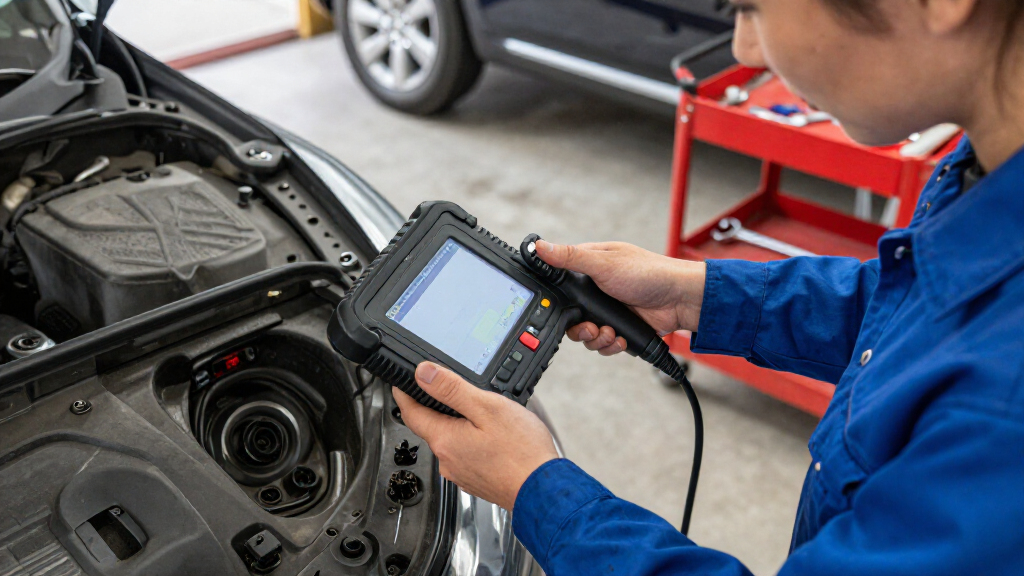

Use this guide to connect an OBD-II diagnostic scanner, read your car’s stored trouble codes, and record the results so you can investigate a warning light or explain the issue to a mechanic. It is for drivers with little or no scanner experience. The task usually takes 15-30 minutes; diagnosis and repairs can take longer.

Get business pricing on garage and car supplies
- Business-only prices and quantity discounts
- Tax-exempt purchasing
- Multiple users, one account, clear invoices

Foxwell NT301 OBD2 Scanner – Live Data Diagnostic Code Reader for Check Engine Light
- ✔ Model: NT301
- ✔ Display: 2.8-inch color screen
- ✔ Functions: Read, clear, and log engine fault codes; live data graphing; I/M readiness

ANCEL AD410 Enhanced OBD2 Scanner – Vehicle Code Reader for Check Engine Light (Black/Yellow)
- ✔ Model: AD410
- ✔ Functions: Reads and clears engine and emissions codes; displays live data
- ✔ Code library: More than 42,000 DTC definitions

ANCEL AD310 Classic Enhanced Universal OBD II Scanner – Black
- ✔ Model: AD310
- ✔ Functions: Reads and clears emission-related trouble codes
- ✔ Protocols: KWP2000, J1850 VPW, ISO9141, J1850 PWM, CAN
Difficulty: Beginner | Time: 15-30 minutes
What You’ll Need
Tools & Materials:
- OBD-II compatible diagnostic scanner or scan tool
- Vehicle owner’s manual
- Phone or notebook to record codes and symptoms
- Flashlight, if the diagnostic port is hard to see
Knowledge:
- Basic familiarity with the vehicle’s ignition and dashboard
- Ability to follow the scanner’s on-screen prompts
Most cars and light trucks sold in the United States from model year 1996 onward use OBD-II. Compatibility and available functions vary by vehicle and scanner. Check the scanner instructions and your vehicle manual before starting. This guide covers reading codes; it does not establish that a part is faulty or replace professional diagnosis.
Foxwell NT301 OBD2 Scanner – Live Data Diagnostic Code Reader for Check Engine Light
The Foxwell NT301 earns the top spot because it gives us more to work with after retrieving a check engine code. Alongside reading, clearing, and logging engine faults, it graphs live sensor data on a 2.8-inch color display. That can help us observe changes in readings as an engine runs, rather than relying on a stored code alone. Its I/M readiness indicators also provide a quick view of emissions monitor status, a practical addition for drivers preparing for an inspection.Compared with the ANCEL AD410, the NT301’s clearest advantage is live data graphing; the AD410 instead emphasizes its built-in definitions for more than 42,000 codes. The AD310 is simpler still, concentrating on reading and clearing emission-related faults. The Foxwell therefore suits buyers who want more diagnostic context without stepping up to a tool for multiple vehicle systems. Its limits matter: it does not cover ABS, SRS, TPMS, service resets, or key programming, and its OBDII scope is not the same as comprehensive professional diagnostics. We should verify vehicle compatibility before relying on it for a particular car.
Pros:
- Graphs live sensor data on a 2.8-inch color screen.
- Reads, clears, and logs engine fault codes.
- I/M readiness indicators show emissions monitor status.
- Supports the listed major OBDII protocols.
Cons:
- Does not diagnose ABS, SRS, TPMS, or other full-system faults.
- Provides no service resets or key programming.
- Vehicle coverage should be confirmed for the specific car.
Best for: DIY owners who want to read engine codes and watch live sensor behavior on the scanner screen.
Not ideal for: Drivers who need ABS, airbag, TPMS, transmission, service reset, or key programming functions.
Bottom line: Pick the Foxwell NT301 when live engine data and readiness status matter more than the ANCEL AD410’s larger code definition library or the AD310’s simpler approach.
“Pick the Foxwell NT301 when live engine data and readiness status matter more than the ANCEL AD410’s larger code definition library or the AD310’s simpler approach.”
ANCEL AD410 Enhanced OBD2 Scanner – Vehicle Code Reader for Check Engine Light (Black/Yellow)
The ANCEL AD410 is a useful middle ground for owners who want explanations on the scanner itself. It reads and clears engine and emissions faults, displays live engine data, and includes definitions for more than 42,000 trouble codes. That library can make an unfamiliar code easier to look up at the car, without needing a smartphone app. Its plug-in design also keeps setup simple: the scanner uses the vehicle connection and needs no separate charger or battery.Against the Foxwell NT301, the AD410’s strongest differentiator is its stated depth of on-screen code definitions; the Foxwell more clearly stands out for graphing live data and showing I/M readiness. Compared with the AD310, the AD410 adds live readings and code explanations, so it is better suited to owners who want to do some interpretation themselves. Still, its extra information does not mean wider system coverage. It remains limited to engine and emissions codes, with no ABS, SRS, transmission, or bidirectional functions. Buyers seeking a single device for multiple vehicle systems should look beyond this trio.
Pros:
- Includes definitions for more than 42,000 trouble codes.
- Displays live readings such as RPM and coolant temperature.
- Works without a battery, charger, or phone app.
- Supports most listed 1996-and-newer OBD2 cars, SUVs, and light trucks.
Cons:
- Limited to engine and emissions diagnostics.
- Does not support ABS, SRS, transmission, or bidirectional functions.
- The provided specifications do not state a screen size or list supported protocols.
Best for: DIY drivers who want code definitions and basic live engine readings available directly on the scanner.
Not ideal for: Owners who need graphing, broad system scans, bidirectional controls, or service functions.
Bottom line: Choose the AD410 for on-device code explanations and live readings, while choosing the Foxwell NT301 if graphing and readiness indicators are the higher priority.
“Choose the AD410 for on-device code explanations and live readings, while choosing the Foxwell NT301 if graphing and readiness indicators are the higher priority.”
ANCEL AD310 Classic Enhanced Universal OBD II Scanner – Black
The ANCEL AD310 is the most straightforward pick in this group. It reads and clears emission-related trouble codes, supports the major OBDII protocols listed, and draws power through the car’s diagnostic connector. A 2.5-foot cable gives us some reach while connecting, and the compact unit is easy to keep with roadside or home tools. For a driver who wants to check what triggered the engine light before deciding on a repair, it covers the core task without a phone app or separate power supply.That simplicity also sets its ceiling. Unlike the AD410, the AD310 does not offer a stated library of on-screen code definitions or live data; unlike the Foxwell NT301, it does not graph sensor readings or provide I/M readiness indicators. It is best understood as a basic reader, not a tool for tracing a developing fault. The stated limitation to emission-related diagnostics is important, and vehicles with only an OBDI interface are incompatible. Confirm that the vehicle has a supported OBDII connection and that the code type you need to investigate falls within the scanner’s scope.
Pros:
- Reads and clears emission-related trouble codes.
- Supports the listed major OBDII protocols.
- Draws power from the vehicle connector, with no batteries needed.
- Has a sturdy build and 2.5-foot cable.
Cons:
- Cannot diagnose non-emission-related engine faults.
- Does not work with vehicles that only have an OBDI interface.
- Offers fewer interpretation and live-data features than the NT301 and AD410.
Best for: Drivers who want a compact, plug-in reader for basic engine and emissions codes on a supported OBDII vehicle.
Not ideal for: DIYers who want live data, built-in code explanations, readiness information, or diagnostics beyond emissions-related engine faults.
Bottom line: Choose the AD310 when basic code reading is enough; its lower complexity comes with fewer ways to investigate a fault than the other two picks.
“Choose the AD310 when basic code reading is enough; its lower complexity comes with fewer ways to investigate a fault than the other two picks.”
As an Amazon Associate we earn from qualifying purchases.
Before You Start
Park on a level surface, apply the parking brake, and switch off accessories. Keep the vehicle in Park or Neutral as appropriate. Do not work near moving parts or hot components. If the check-engine light is flashing, the engine is running roughly, or the vehicle has lost power, stop driving when safe and seek qualified help; continued driving may cause damage.
Do not clear codes before recording them. Clearing can erase useful diagnostic information and readiness status, and it will not fix the cause. Some scanners request the ignition to be on while the engine stays off; follow the scanner prompts.
Step-by-Step Instructions
Step 1: Find the diagnostic port
Switch off the ignition, then look beneath the dashboard on the driver’s side, usually near the steering column, for the 16-pin OBD-II port. Consult the owner’s manual if you cannot find it. Check that the connector is not visibly damaged or obstructed.
Tip: Do not force the scanner connector into the port. Align its shape and pins, then press it in gently.
Check: The port is identified and accessible without removing panels or pulling on nearby wiring.
Step 2: Connect the scanner
Plug the scanner’s connector into the port with the ignition off. If using a wireless adapter, connect it as its instructions specify. Route the cable clear of the pedals and your feet.
Tip: Some scanners draw power from the port and turn on immediately; others need a separate power button.
Check: The scanner powers on or indicates that it is ready to connect.
Step 3: Turn on the ignition as prompted
Check the scanner’s instructions for the required ignition state. If prompted, turn the key to the ON position without starting the engine, or press the start button without pressing the brake or clutch. Keep the engine off unless the scanner specifically requests it.
Tip: Dashboard warning lights may appear when the ignition is on and the engine is off. That is expected during this check.
Check: The scanner recognizes the vehicle or advances to its vehicle selection or diagnostic menu.
Step 4: Select the vehicle and read codes
Select the vehicle details if the scanner asks for them, then choose a function such as Read Codes, Diagnostic Trouble Codes, or Scan. Wait for the scan to finish. Record every code exactly, including its letter and digits, and note whether the scanner labels it stored, pending, or permanent.
Tip: A code identifies a system or condition the computer detected; it does not prove that the named component has failed.
Check: The scanner displays results or reports that no codes are present. Record either result along with the date and mileage.
Step 5: Save the vehicle data
Write down or save the codes, descriptions, mileage, warning lights, and symptoms. Capture freeze-frame data if available; it records conditions such as engine speed and temperature when a fault was logged. Save this information before disconnecting or clearing anything.
Tip: Include when the symptom happens, such as during a cold start, acceleration, or refueling. Those details can help narrow down diagnosis.
Check: You have a readable record of the codes and relevant symptoms outside the scanner.
Step 6: Look up the code and choose a next step
Look up the scanner’s code description in the vehicle service information or a reliable repair reference for that exact code and vehicle. Check whether the code is generic or manufacturer-specific. Consider related symptoms and any other codes before deciding what to inspect or repair.
Tip: If you are unsure how to interpret the results, share the exact codes and your notes with a qualified mechanic. Avoid replacing parts based on a code description alone.
Check: You can explain what the code reports, what symptoms occur, and whether further diagnosis or professional service is needed.
Step 7: Disconnect the scanner
Switch the ignition off, then unplug the scanner by holding its connector rather than pulling on the cable. If using a wireless device, remove or disconnect it as directed. Return the vehicle to its normal state before starting it.
Tip: Keep your saved code record. A mechanic may find it useful even if the warning light later goes out.
Check: The scanner is removed, no cable or adapter remains in the driver’s footwell, and your results are saved.
Common Mistakes to Avoid
- Clearing codes before recording them. — Save all codes and available freeze-frame data first; clearing may remove information useful for diagnosis.
- Treating a code as proof that a particular part has failed. — Use the code as a clue, then check service information, symptoms, wiring, and related systems before replacing parts.
- Using the wrong ignition state or starting the engine when the scanner says not to. — Follow the prompts for your specific scanner and vehicle; leave the engine off unless instructed otherwise.
- Ignoring a flashing warning light or severe symptoms because the scan can be completed. — Stop driving when safe and arrange qualified help if the engine light flashes, the car runs roughly, or power drops.
Troubleshooting
Problem: The scanner will not power on.
Solution: Check that the connector is fully seated and the ignition is in the state required by the scanner. Consult the manual for its power source. If it still has no power, the vehicle’s diagnostic-port fuse or wiring may need inspection.
Problem: The scanner powers on but cannot communicate with the vehicle.
Solution: Confirm that the scanner supports the vehicle’s model year and systems, recheck the ignition position, and try selecting the vehicle manually. If communication still fails, stop and consult a repair professional; do not probe the port pins.
Problem: No codes appear even though a warning light is on.
Solution: Confirm that you chose the correct code-reading function and that the scanner completed the scan. Some basic tools read only engine-related codes, while other warning systems need a more capable scanner. Have the vehicle checked if the warning remains.
Problem: A code description is unclear or does not match the symptoms.
Solution: Record the exact code and whether it is pending, stored, or permanent. Look it up for the correct vehicle and engine, then seek a full diagnosis instead of clearing it or replacing a part based only on the description.
What Success Looks Like
You have read the scanner’s results, saved every displayed code and relevant vehicle data, and noted the symptoms and mileage. You have a reasonable next step based on the results. A successful scan means the information was retrieved and recorded; it does not by itself mean the fault is repaired.
Next Steps
Keep the code record with your maintenance notes and provide it to a mechanic if you book service. Follow the vehicle-specific diagnostic advice before authorizing repairs. Clear codes only when you understand why, have saved the original results, and are following a repair or service procedure. If a warning returns or symptoms worsen, arrange diagnosis promptly.
Frequently Asked Questions
Can I use an OBD-II scanner on any car?
Many cars and light trucks sold in the United States from model year 1996 onward support OBD-II, but scanner compatibility and system coverage vary. Check the tool’s compatibility list and the vehicle manual.
Will reading codes damage the car?
Reading codes with a compatible scanner is generally a non-invasive check. Connect it correctly, follow its prompts, and do not force the plug or probe port pins.
Should I erase the code after reading it?
Not before saving the code and any available freeze-frame information. Erasing a code does not repair the cause and can remove useful diagnostic data.
What does it mean if the scanner finds no codes?
The tool may not have found a code in the systems it can read. Some scanners cover only engine diagnostics, and an intermittent fault may not be stored as a current code. A warning or symptom still needs attention if it continues.
Evergreen bestsellers Picks

Shark PowerPro Reveal Plus Cordless Stick Vacuum, Charcoal (IZ376H)

Sony WH-1000XM6 Wireless Noise-Cancelling Headphones – Midnight Blue

Ninja Foodi 10-Qt DualZone 6-in-1 Air Fryer, Black (DZ302)
As an affiliate, we earn on qualifying purchases.