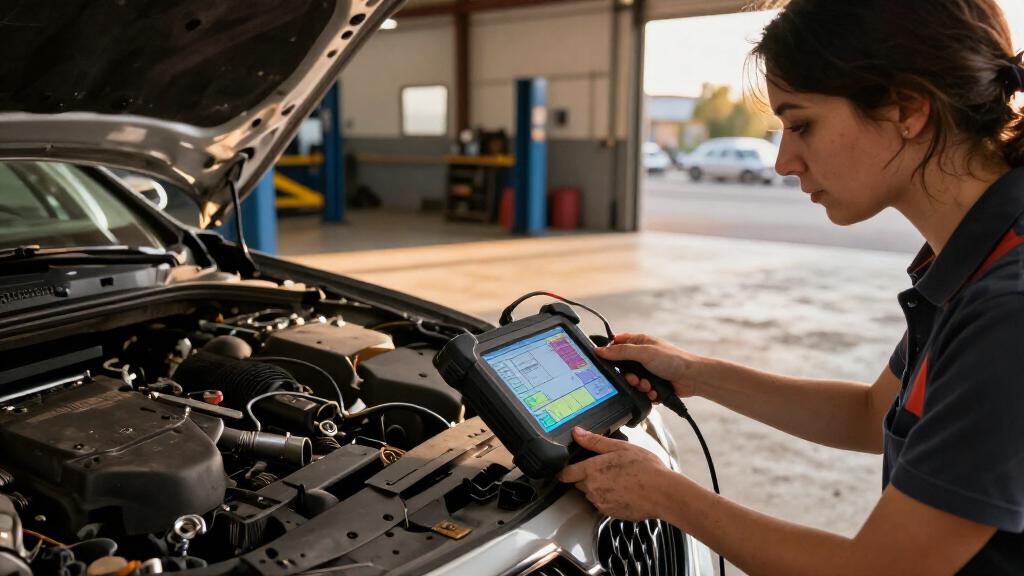

Use this guide to connect an automotive diagnostic scanner, retrieve diagnostic trouble codes, and review basic vehicle data. It is for drivers with little or no scan-tool experience who want to understand a warning light before arranging repairs. Allow about 20-40 minutes, depending on the scanner and vehicle. A scanner can identify reported faults, but a code alone does not prove which part has failed.

Get business pricing on garage and car supplies
- Business-only prices and quantity discounts
- Tax-exempt purchasing
- Multiple users, one account, clear invoices

FOXWELL NT604 Elite OBD2 Car Scanner – ABS, SRS & Transmission Diagnostics
- ✔ Diagnostic systems: Engine, transmission, ABS, and SRS
- ✔ Screen: 4.3-inch color display, 480 × 272 resolution
- ✔ Live data: Monitoring with graphing

FOXWELL NT301 OBD2 Scanner Live Data Professional Mechanic OBDII Diagnostic Code Reader Tool
- ✔ Model: NT301
- ✔ Screen: 2.8-inch color display
- ✔ Diagnostics: Engine trouble codes, live data, and I/M readiness

ANCEL AD310 Classic Enhanced Universal OBD II Scanner – Black
- ✔ Model: AD310
- ✔ Protocols: KWP2000, J1850 VPW, ISO9141, J1850 PWM, and CAN
- ✔ Vehicle coverage: 1996+ US; 2000+ EU; listed Asian cars, light trucks, and SUVs
Difficulty: Beginner | Time: 20-40 minutes
What You’ll Need
Tools & Materials:
- OBD-II or vehicle-compatible diagnostic scanner
- Vehicle owner’s manual
- Phone or notebook to record codes and observations
Knowledge:
- Basic ability to locate the vehicle’s diagnostic connector
- Ability to follow the scanner and vehicle maker’s safety instructions
Most cars and light trucks sold in the United States from model year 1996 onward use OBD-II. Compatibility varies by region, vehicle year, make, and scanner. Check the scanner’s compatibility list before starting. Some vehicles need a manufacturer-specific tool for systems beyond the engine and emissions controls.
FOXWELL NT604 Elite OBD2 Car Scanner – ABS, SRS & Transmission Diagnostics
The FOXWELL NT604 Elite earns the top position because it checks more of the car than the other scanners here. On supported vehicles, it reads and clears codes for the engine, transmission, ABS, and SRS systems. That makes it a more useful first stop when a warning light could involve brakes or airbags, areas the NT301 and AD310 do not claim to cover. We still need to verify compatibility for our particular vehicle before relying on those extra systems.Its 4.3-inch color screen and live-data graphing keep the device self-contained: we can review information without pairing a phone or opening an app. Wi-Fi updates are included, which helps maintain software coverage as supported vehicles change. Compared with the NT301’s smaller display and engine-focused data, the NT604 Elite is better for people who want broader scans and a more readable overview.That breadth has boundaries. This is not a service-function or programming tool: the listed exclusions include bidirectional tests, ECU coding, ABS bleeding, and several resets. Buyers who only want to read an engine light may find it more scanner than they need, while those expecting professional repair functions should look beyond this lineup. Its lead is system coverage, not access to every diagnostic or maintenance procedure.
Pros:
- Reads and clears codes across engine, transmission, ABS, and SRS systems on supported vehicles.
- Built-in 4.3-inch color display works without a phone or Bluetooth connection.
- Live-data graphing and a scan overview help organize diagnostic information.
- Free Wi-Fi updates and a protective case are included.
Cons:
- Vehicle compatibility varies and should be checked before purchase.
- Does not support listed functions such as active tests, ECU coding, ABS bleeding, or several service resets.
- No Bluetooth or smartphone app integration.
Best for: Drivers or home mechanics who want to check engine, transmission, ABS, and SRS codes on a vehicle confirmed as compatible.
Not ideal for: Buyers who need bidirectional tests, coding, service resets, or a smartphone-connected workflow.
Bottom line: For the broadest system checks in this comparison, we would start with the NT604 Elite after confirming vehicle coverage and accepting its service-function limits.
“For the broadest system checks in this comparison, we would start with the NT604 Elite after confirming vehicle coverage and accepting its service-function limits.”
FOXWELL NT301 OBD2 Scanner Live Data Professional Mechanic OBDII Diagnostic Code Reader Tool
The FOXWELL NT301 is a more informative engine-focused reader than the AD310. It reads and clears engine trouble codes, shows live data, and offers a one-click I/M Readiness check. That last feature gives us a quick way to see readiness status when preparing for an emissions inspection; it does not guarantee a pass or repair an underlying problem. For buyers who want more than a code number but do not need ABS or SRS coverage, the NT301 is the better fit.Live data can help us interpret what the engine is doing by showing values such as RPM and coolant temperature, with graphs for easier comparison. Its 2.8-inch color screen is smaller than the NT604 Elite’s 4.3-inch display, and this model covers a narrower set of systems. In return, it focuses its features on engine checks rather than presenting itself as a multi-system scanner.The NT301 supports major OBDII protocols and draws power from the car’s port, so it needs no separate battery. Its defined compatibility includes 1996-and-newer US-market cars, SUVs, and light trucks, though individual coverage can vary. Buyers who need transmission, ABS, or airbag diagnostics should step up to the NT604 Elite and confirm coverage. Those who only need basic emissions-code reading could choose the simpler AD310 instead. The NT301’s advantage is context: live readings and readiness status alongside engine codes.
Pros:
- Reads and clears engine trouble codes and displays on-screen code definitions.
- Shows live data and graphs for values such as RPM and coolant temperature.
- One-click I/M Readiness check simplifies checking inspection status.
- Powered by the OBDII port and supports major protocols including CAN.
Cons:
- The 2.8-inch screen is smaller than the NT604 Elite’s display.
- Focused on engine diagnostics rather than ABS, SRS, or transmission systems.
- Compatibility and advanced functions can vary by vehicle.
Best for: Owners and DIY mechanics who want engine codes, live data, and an inspection-readiness check in one handheld reader.
Not ideal for: Anyone who needs ABS, SRS, transmission-system coverage, or a larger screen for extended data review.
Bottom line: The NT301 is our pick for engine-focused buyers who value live data and readiness status more than the AD310’s simpler operation or the NT604 Elite’s broader system coverage.
“The NT301 is our pick for engine-focused buyers who value live data and readiness status more than the AD310’s simpler operation or the NT604 Elite’s broader system coverage.”
ANCEL AD310 Classic Enhanced Universal OBD II Scanner – Black
The ANCEL AD310 is the straightforward choice for a narrow job: reading and clearing emission-related diagnostic trouble codes. It supports major OBDII protocols, including CAN, and its stated vehicle coverage includes 1996-and-newer US vehicles plus 2000-and-newer EU vehicles and Asian cars, light trucks, and SUVs. Like the NT301, it plugs into the vehicle and does not require a separate battery or charger. Its large, clearly labeled controls keep basic code checks uncomplicated.Compared with the NT301, the AD310 gives up live data graphs and the one-click readiness check. That makes it less helpful when we want to observe engine values or review inspection readiness, but its simpler feature set suits someone who wants a direct code reader. The NT604 Elite goes further still with transmission, ABS, and SRS coverage; the AD310 is not a substitute when a warning may come from one of those systems.The crucial limitation is the word emission-related: the supplied description says it cannot read other engine faults. It also does not support OBDI vehicles, even with an adapter. Its 2.5-foot cable offers room to position the handheld, though the NT301 is the more capable engine-data pick for buyers who want context beyond codes. Choose the AD310 when basic emissions-code reading is enough, and skip it if you expect broad diagnostics.
Pros:
- Reads and clears emission-related codes without a separate battery or charger.
- Supports major OBDII protocols, including CAN.
- Large screen, labeled buttons, and a 2.5-foot cable support simple handheld use.
- Stated coverage spans compatible US, EU, and Asian vehicles.
Cons:
- Limited to emission-related diagnostic trouble codes.
- Does not support OBDI vehicles, even when using an adapter.
- Lacks the live data and readiness features offered by the NT301.
Best for: Drivers who want a compact, direct tool for reading and clearing emission-related codes on a compatible OBDII vehicle.
Not ideal for: Buyers who want live data, readiness checks, non-emissions engine diagnostics, or OBDI support.
Bottom line: The AD310 makes sense when basic emission-code checks are the whole task, but the NT301 is the more useful engine reader if we want live data and readiness information.
“The AD310 makes sense when basic emission-code checks are the whole task, but the NT301 is the more useful engine reader if we want live data and readiness information.”
As an Amazon Associate we earn from qualifying purchases.
Before You Start
Park on level ground, set the parking brake, and switch off accessories. Keep clear of moving parts and hot components. Follow your vehicle manual and scanner instructions if they differ from this guide. Do not disconnect the battery or clear codes as a first step: doing so can erase useful diagnostic information and readiness status. If the engine warning light is flashing, the engine is running roughly, or the vehicle has a serious braking, steering, overheating, or fuel leak problem, stop driving when safe and arrange professional help.
Step-by-Step Instructions
Step 1: Confirm scanner compatibility
Check the scanner’s supported vehicle list against your car’s year, make, and model. Confirm whether you want to read engine and emissions codes only or also scan systems such as ABS, airbags, or transmission. Make sure the scanner supports those systems before connecting it.
Tip: A basic code reader may show only powertrain codes. It may not communicate with other control modules, even if the vehicle has a warning light for one of them.
Check: The scanner documentation lists your vehicle and the systems you plan to scan.
Step 2: Prepare the vehicle and scanner
Park safely, set the parking brake, and switch off the ignition. Read the scanner’s quick-start instructions. If it uses an app, install it and check that the phone has enough charge. Do not start the engine unless the scanner asks you to do so.
Tip: Keep the scanner cable away from pedals and the driver’s feet. A loose cable can interfere with the controls.
Check: The vehicle is stationary, the scanner is ready, and the connector cable can reach without crossing the pedals.
Step 3: Locate the diagnostic connector
Look for the OBD-II connector under the dashboard near the steering column. If it is not visible, check the owner’s manual for its location. Do not force open trim panels or push a connector into a socket that does not match its shape.
Tip: The connector is usually a 16-pin trapezoid. Its position varies, and some vehicles place it behind a small access cover.
Check: You have found a matching diagnostic socket and can reach it without straining or removing vehicle parts.
Step 4: Connect the scanner
With the ignition off, align the scanner plug with the diagnostic socket and press it in gently until it is seated. For a wireless adapter, plug it in as directed, then pair it with the app using the scanner maker’s instructions. Turn the ignition to the ON position without starting the engine, unless the scanner tells you otherwise.
Tip: Do not force the plug. If it does not fit, check its orientation and confirm that you have the right connector.
Check: The scanner powers on or the app detects the adapter, and the vehicle’s dashboard electronics are on.
Step 5: Read and record the codes
Choose the scanner option to read diagnostic trouble codes, often labeled “Read Codes” or “Scan.” Wait for the scan to finish. Record each code exactly as shown, including its letter and digits, and note whether it is stored, pending, or permanent. Save any displayed freeze-frame information, such as engine speed or temperature, before leaving the results screen.
Tip: A code describes a condition the vehicle detected. It does not always identify the failed part. Record all codes before looking them up or clearing anything.
Check: You have a complete written or saved list of codes and their status, or the scanner reports that no codes are stored.
Step 6: Review the scanner’s additional information
If available, check the scanner’s system status and live data. Select a small number of relevant readings, such as engine coolant temperature or oxygen sensor data, and follow the tool’s prompts. Compare the displayed values with the vehicle’s service information when available. Do not treat a single reading as a diagnosis without checking the conditions under which it was recorded.
Tip: Live readings can change with engine temperature, load, and operating state. Use the scanner manual or a reliable vehicle-specific repair source to interpret them.
Check: You have recorded any useful status or live-data readings along with when and how they were captured.
Step 7: Look up the codes and choose a next step
Use the vehicle manual, scanner documentation, or a reliable repair reference to find what each code means for your vehicle. Note any conditions or symptoms that occurred around the same time. If the warning light is flashing, the engine runs poorly, or the code relates to a safety system, stop and seek qualified diagnosis. Otherwise, arrange a repair inspection or use vehicle-specific service information to plan further checks.
Tip: Avoid buying replacement parts based only on a code description. Several faults can trigger similar codes, and proper diagnosis may require tests beyond a scan.
Check: You have a recorded code list, a basic understanding of the reported system, and a sensible repair or inspection plan.
Step 8: Disconnect the scanner and preserve the record
Turn the ignition off and unplug the scanner or wireless adapter as directed by its maker. Store your code list with the date, mileage, warning-light behavior, and symptoms. Leave the codes in place until the cause has been diagnosed or a repair professional advises otherwise.
Tip: Do not choose “Clear Codes” simply to turn off a warning light. Clearing codes does not repair the fault and can remove diagnostic clues.
Check: The scanner is disconnected, the vehicle is off, and the scan results are saved for the next inspection.
Common Mistakes to Avoid
- Assuming the code names the exact part that needs replacement. — Treat the code as a description of a detected condition. Confirm the cause with vehicle-specific checks before replacing parts.
- Clearing codes before recording them or saving freeze-frame data. — Write down every code and capture available context first. Clear codes only when there is a clear reason, such as after a repair and under appropriate guidance.
- Using a scanner that does not support the vehicle or system. — Check coverage by year, make, model, and module before scanning. A basic reader may not access ABS, airbag, or manufacturer-specific faults.
- Driving normally with a flashing warning light or serious symptoms. — Stop in a safe place and arrange professional help when the engine light flashes or the vehicle shows signs of overheating, poor control, or another urgent fault.
Troubleshooting
Problem: The scanner does not power on.
Solution: Check that the plug is fully seated, the ignition is in the position specified by the scanner, and the vehicle battery is not discharged. Consult the vehicle manual if the diagnostic port has a fuse.
Problem: The scanner powers on but cannot communicate with the vehicle.
Solution: Confirm vehicle compatibility, check the connector fit, and follow the tool’s ignition instructions. If the problem continues, the port, fuse, vehicle battery, or scanner may need inspection.
Problem: The scanner reports no codes, but a warning light is on.
Solution: Confirm that you selected the relevant system and that the scanner supports it. Some tools read engine codes only; a vehicle-specific scan tool may be needed for other modules.
Problem: A code returns after a repair or after clearing it.
Solution: Record the returning code and any symptoms. The fault may still be present, the repair may need further checks, or the vehicle may not yet have completed its monitoring cycle. Have it diagnosed with suitable service information.
What Success Looks Like
The scan is complete when you have saved the exact codes and their status, captured useful freeze-frame or live data when available, and disconnected the tool safely. You should know which system reported a problem and what inspection or repair step comes next. A warning light going out is not, by itself, proof that the underlying fault is fixed.
Next Steps
Share the code list, mileage, symptoms, and scan date with a repair professional. After a confirmed repair, follow the technician’s or vehicle maker’s advice about clearing codes and completing a drive cycle. Re-scan if the warning returns, and keep the new results with the original record.
Frequently Asked Questions
Can I use an automotive diagnostic scanner without starting the engine?
Usually, yes. Many scanners read codes with the ignition on and the engine off. Follow the instructions for your specific scanner and vehicle; some live-data checks require the engine to run.
Will a scanner tell me exactly what part to replace?
Usually not. A scanner reports codes and measurements from vehicle systems. A technician or a careful diagnostic process uses those results alongside symptoms and further tests to identify the cause.
Should I clear the codes after reading them?
Do not clear them just to switch off a warning light. Save the codes and related data first, then clear them only after the fault has been diagnosed or repaired and when the vehicle maker’s guidance supports it.
Why can’t my scanner read an ABS or airbag warning?
Your scanner may support engine and emissions codes but not those control modules. Check its system coverage; a compatible advanced or manufacturer-specific scanner may be needed.